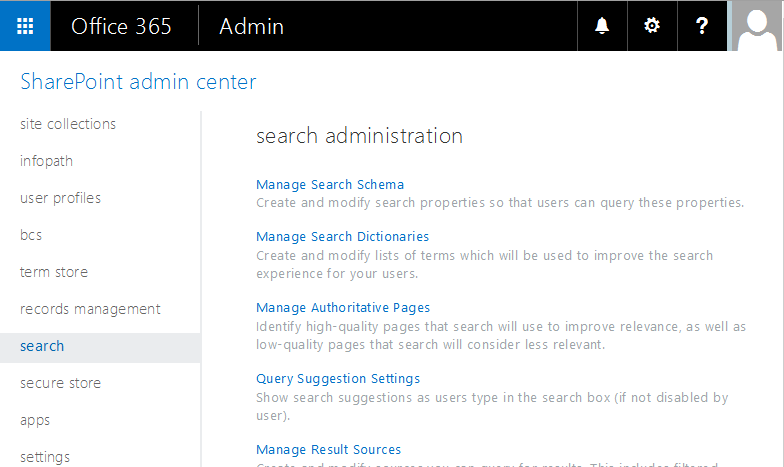
In order to access the custom managed properties we have to add them under SharePoint -> SharePoint admin center -> Manage Search Schema
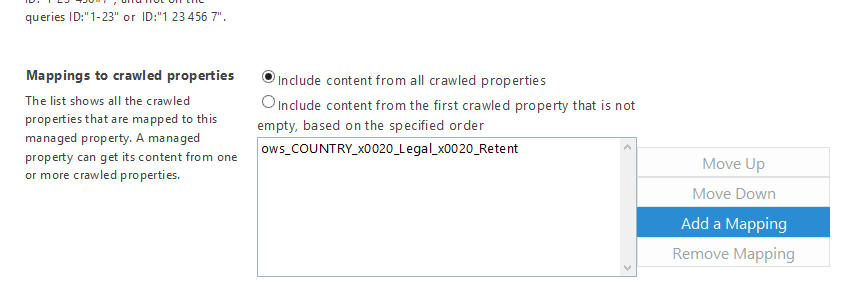
You simply add your new managed property and associate it with the crawled property.
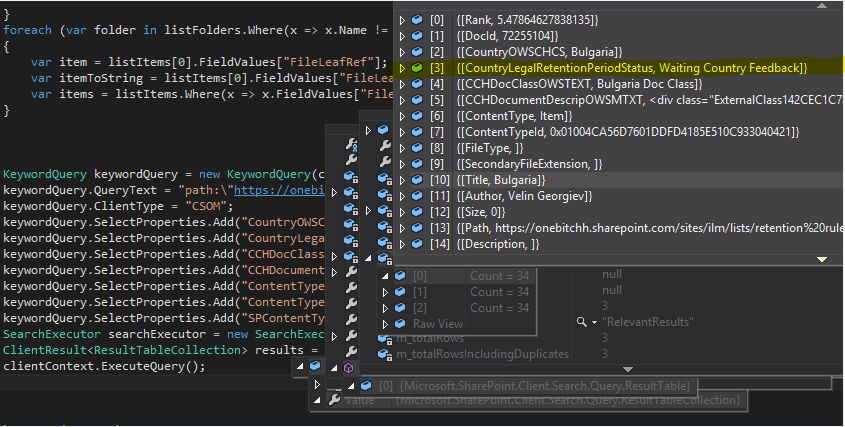
Then your CSOM C# code should look like this:
KeywordQuery keywordQuery = new KeywordQuery(clientContext);
                    keywordQuery.QueryText = "path:\"https://onebitchh.sharepoint.com/sites/ilm/lists/Retention Rules\" AND ContentType:Item";
                    keywordQuery.ClientType = "CSOM";
                    keywordQuery.SelectProperties.Add("CountryOWSCHCS");
                    keywordQuery.SelectProperties.Add("CountryLegalRetentionPeriodStatus");
                    keywordQuery.SelectProperties.Add("CCHDocClassOWSTEXT");
                    keywordQuery.SelectProperties.Add("CCHDocumentDescripOWSMTXT");
                    keywordQuery.SelectProperties.Add("ContentType");
                    keywordQuery.SelectProperties.Add("ContentTypeId");
                    keywordQuery.SelectProperties.Add("SPContentType");


                    SearchExecutor searchExecutor = new SearchExecutor(clientContext);
                    ClientResult<ResultTableCollection> results = searchExecutor.ExecuteQuery(keywordQuery);
                    clientContext.ExecuteQuery();


If the  crawl is finished you should be able to see the results from your new managed property associated with site/list column: